Kling 4.0 Review: Features, Limits, and ZMS Value Guide
This Kling 4.0 review weighs its text, mixed-reference, and keyframe workflows against ZMS’s current resolution limits and credit costs. It includes hands-on tests, attributed outside reviews, and practical guidance on which projects may benefit.

Kling 4.0 is a video-generation model built around text, visual references, and keyframes. On ZMS, its main appeal is the choice between describing a scene, guiding it with reference media, or anchoring important moments with ordered images. Its practical value depends on how much direction your project needs and whether the ZMS workspace’s current 720p/1080p limits and credit rates fit your workflow.
This review looks at Kling 4.0 from a practical ZMS user perspective. It covers the available workflows, output settings, credit costs, limitations, and three generated clips: a red paper boat in a garden stream, a blue perfume bottle in a coastal gallery, and a keyframe-guided perfume-bottle shot.
The three clips provide useful examples of how the workflows behave in specific cases. They are not a large-scale benchmark, and they do not establish a universal success rate. Audio has not yet been evaluated, and some details—including exact keyframe adherence and subtle visual changes—require closer inspection.
Workspace and credit details checked October 29, 2026. Confirm current settings and prices before generating.
Kling 4.0 Review: The Short Verdict
Kling 4.0 on ZMS is worth exploring when a video project benefits from a clearly described action, visual references, or planned keyframes. The three tested clips show recognizable main subjects and broadly coherent environments, although the degree of motion and the accuracy of individual details still need to be judged against each prompt.
The text-to-video paper-boat clip includes the requested subject and setting, but the boat’s apparent movement deserves closer review. The mixed-reference perfume-bottle clip maintains a recognizable product within a coastal gallery. The keyframe clip shows a gradual move toward a closer product composition, though exact adherence to the original keyframes has not yet been confirmed.
The main tradeoffs are practical: ZMS currently offers 720p and 1080p rather than the full range of specifications associated with Kling’s wider model offering, and video references can affect credit billing. The three test generations used 320 credits in total.
Quick take | Assessment |
|---|---|
Best reason to consider it | Direct a shot using text, mixed references, or keyframes |
Most relevant tested use case | Short product and scene concepts with a recognizable main subject |
Main ZMS constraint | The current output selector offers 720p and 1080p |
Test sample | Three generated clips across three workflows |
Credits used in the recorded tests | 320 credits total |
Important caveat | Initial observations, not a comprehensive reliability benchmark; audio is not yet evaluated |
What Does Kling 4.0 Offer?
Kling’s official materials describe text-to-video, image-to-video, first and last frames, multiple keyframes, and reference inputs. The official release lists up to 10 keyframe images, video generation from 3 to 30 seconds, and output resolutions up to 4K on Kling’s own platform. These broader model specifications should not be confused with the controls currently available through ZMS.
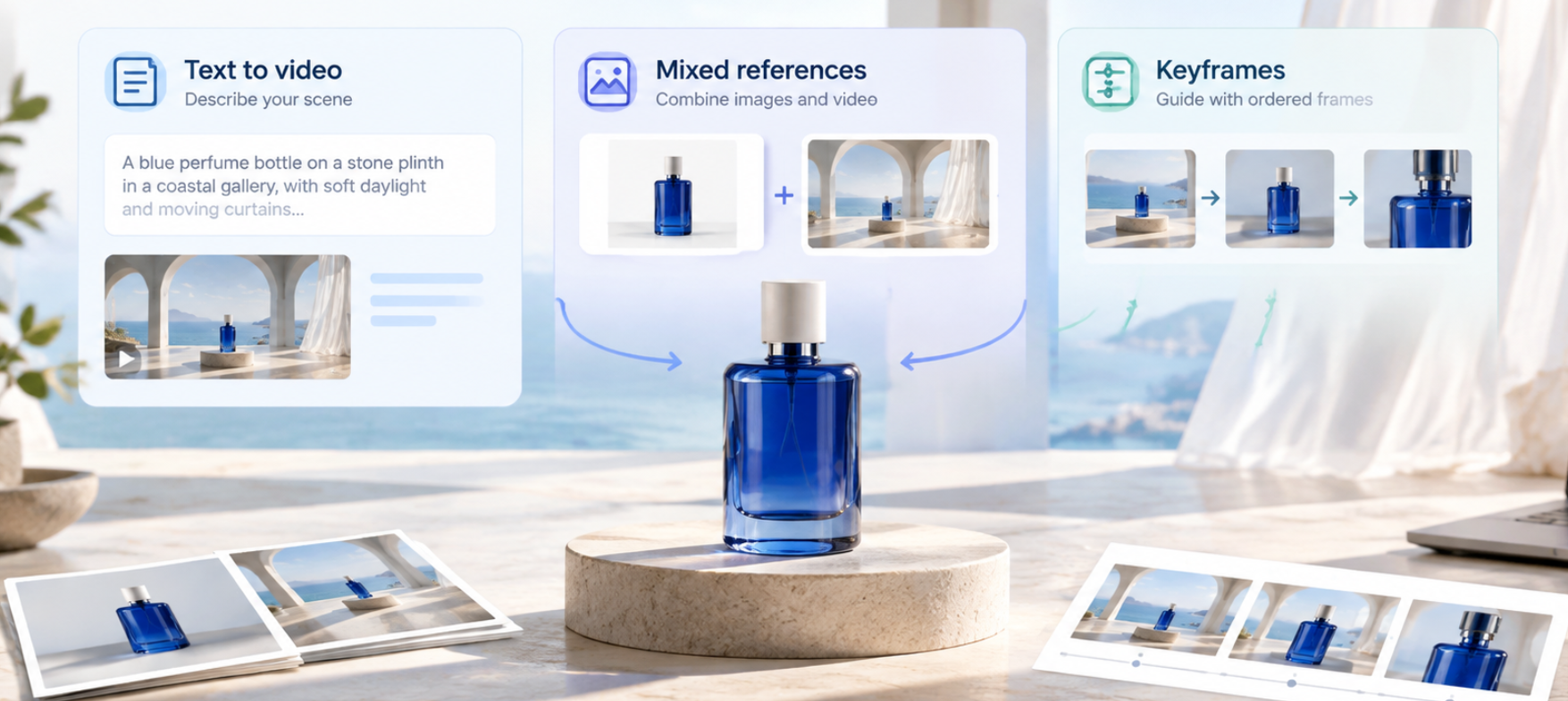
In the ZMS interface reviewed for this article, the mode selector labels the workflows Text to video, Mixed references, and Keyframes. The Text to video output panel offers 16:9, 9:16, 1:1, and 21:9 aspect ratios; 720p or 1080p; and durations from 3 to 30 seconds. Mixed references can include images, video, and audio, subject to workspace-specific format and file limits.
What the Visible Output Controls Mean for a Project
Control | Practical choice |
|---|---|
Aspect ratio | Match the destination first: 9:16 for vertical mobile placements, 16:9 for widescreen, 1:1 for square layouts, or 21:9 for a wider cinematic frame. |
Resolution | The ZMS panel offers 720p and 1080p. Use 720p when a lower-cost draft is sufficient; choose the delivery resolution after checking framing and motion. |
Duration | Select 3–30 seconds. Use the shortest duration that gives the action room to read, because longer output costs more credits. |
Workflow | Use Text to video for a written scene brief, Mixed references when existing media should guide the output, or Keyframes when specific visual states matter. |
These settings are controls available in the reviewed interface, not a guarantee that every account or future session will open with identical selections. Check the live panel and cost estimate before each generation.
Real-World Test Results: Three Kling 4.0 Workflows on ZMS
To examine the practical differences between the three workflows, I reviewed three generated clips. The tests cover a text-prompted paper-boat scene, a perfume bottle placed in a coastal gallery using mixed references, and a perfume-bottle sequence guided by keyframes.
Each test represents one generated clip. The observations below describe the submitted outputs and sampled frames; they should not be treated as universal performance claims.
Test Setup
Test | Workflow | Planned settings | Actual credits |
|---|---|---|---|
A | Text to video | 720p, 16:9, 5 seconds, no references | 100 |
B | Mixed references | 720p, 16:9, 5 seconds, bottle and gallery image references | 100 |
C | Keyframes | 720p, 16:9, 6 seconds, three planned keyframes | 120 |
Total | Three generations | 320 credits |
The settings follow the planned configuration supplied for the tests. The submitted files report these technical properties:
Text to video: 1280 × 720, approximately 5.04 seconds, 24 fps.
Mixed references: 1280 × 720, approximately 5.04 seconds, 24 fps.
Keyframes: 1284 × 724, approximately 6.04 seconds, 24 fps.
The third file’s reported dimensions differ slightly from the other two. This is a technical observation about the file, not evidence that the workflow produces better or worse image quality.
Test 1: Text to Video — A Red Paper Boat in a Garden Stream
Test focus: Subject visibility, scene adherence, requested movement, and camera behavior.
The generated clip contains a red paper boat, shallow water, stones, greenery, and a wooden bridge in the background. The boat remains recognizable in the sampled frames, and the overall composition is broadly consistent with the intended garden-stream scene.
However, the boat’s movement appears limited in the sampled frames. A small yellow object also becomes visible in the water later in the clip. Its origin and whether it represents an unintended generated element have not been established.
What this suggests
The clip demonstrates that the main subject and several requested environmental elements can appear together in a recognizable scene. Yet visual presence alone does not prove that the requested action has been fully executed. If a prompt calls for a subject to travel along a path, pass an obstacle, or stop at a specific point, the full sequence needs to be checked for those events.
Evidence status
Observed: The red boat and most of the requested setting are visible.
Preliminary assessment: The boat’s downstream movement may be weaker than intended.
Still to verify: The full motion sequence, the origin of the yellow object, and the audio’s relevance and quality.
Review takeaway: For text-to-video tasks, check whether the requested action unfolds—not only whether the correct objects appear in the frame.
Test 2: Mixed References — A Blue Perfume Bottle in a Coastal Gallery
Test focus: Subject consistency, reference integration, and scene stability.
The generated clip shows a cobalt-blue bottle with a light-colored cap on a round stone plinth. Arched windows, a sea view, pale interior surfaces, and soft daylight are visible. Across the sampled frames, the bottle remains recognizable and the gallery composition stays broadly consistent. The curtains also show visible movement.
No obvious disappearance of the main product or major scene change is apparent in the sampled frames. This does not rule out smaller changes in bottle geometry, reflections, or material details.
What this suggests
The clip provides a useful example of a product subject appearing within a specified environment. The bottle remains visually prominent, while the gallery establishes the scene around it. The visible curtain movement adds motion without substantially changing the composition.
A single generated result cannot establish exactly how much each reference image influenced the output. A controlled comparison using the same prompt with one reference removed would be needed to isolate the contribution of each input.
Evidence status
Observed: The bottle, plinth, gallery, windows, and sea view are present; the main composition remains broadly stable.
Preliminary assessment: Subject and environment consistency appear promising in this example.
Still to verify: Exact reference fidelity, subtle product deformation, and audio quality.
Review takeaway: Mixed references are worth exploring when a recognizable product must appear in a particular environment. Inspect product geometry and reference fidelity rather than judging the result by atmosphere alone.
Test 3: Keyframes — A Continuous Perfume-Bottle Product Shot
Test focus: Transition continuity, visual-state progression, and subject consistency.
The clip shows a blue perfume bottle on a stone plinth in a bright coastal gallery. Across the sampled frames, the bottle becomes larger in the composition, consistent with a gradual camera push-in. The arched windows, sea view, and overall lighting remain broadly coherent.
The product stays recognizable in the sampled sequence, and no major scene discontinuity is obvious in those frames. Subtle changes in the bottle’s proportions, cap, or reflections would require closer frame-by-frame inspection.
What this suggests
The clip demonstrates a visually coherent progression toward a closer product composition. This type of sequence can be relevant to product films, storyboard-based content, and other shots where the opening and ending visual states matter.
However, evaluating keyframe adherence requires comparing the output against the actual input keyframes and their order. The video alone cannot confirm that every supplied keyframe was reproduced accurately or that all intended intermediate details were preserved.
Evidence status
Observed: The bottle remains recognizable, the framing gradually tightens, and the overall environment stays coherent in sampled frames.
Preliminary assessment: The sequence appears consistent with a controlled push-in.
Still to verify: Exact adherence to all three source keyframes, subtle temporal artifacts, and audio quality.
Review takeaway: Evaluate both the important visual states and the transitions between them. A plausible camera move is useful, but it does not by itself prove exact keyframe adherence.
Side-by-Side Test Summary
Evaluation dimension | Text to video | Mixed references | Keyframes |
|---|---|---|---|
Main subject visible | Yes — red paper boat | Yes — blue perfume bottle | Yes — blue perfume bottle |
Main scene elements present | Most requested elements visible | Bottle and gallery elements visible | Bottle and gallery elements visible |
Motion observed | Boat movement appears limited in sampled frames | Curtain movement; composition broadly stable | Gradual move toward a closer composition |
Main point to investigate | Unexpected yellow object and degree of boat movement | Fine product details and reference fidelity | Exact keyframe adherence and subtle changes |
Actual credits recorded | 100 | 100 | 120 |
Audio assessment | Not yet evaluated | Not yet evaluated | Not yet evaluated |
What These Tests Tell Us — and What They Do Not
Across the three examples, Kling 4.0 produced recognizable subjects and broadly coherent environments. The mixed-reference and keyframe clips maintain the perfume bottle as the central subject, while the text-to-video clip contains the requested paper boat and garden-stream setting.
The differences are more informative than a blanket quality claim. The paper-boat example raises a question about how fully the requested movement is executed. The mixed-reference example is useful for examining subject preservation within a specified environment. The keyframe example shows a gradual change in framing, but needs comparison with the source images to establish how closely the intended visual states were followed.
The three recorded generations used 320 credits in total: 100 for text-to-video, 100 for mixed references, and 120 for keyframes. These figures describe the submitted test runs only. They do not establish the average cost of obtaining a usable result, because additional generations or editing may be needed for other prompts.
Audio has not yet been evaluated. No conclusion about sound quality, synchronization, or native audio performance should be drawn from these clips.
This is an initial practical sample rather than a comprehensive benchmark. Repeated runs, explicit comparison with the source references, and a separate audio review would be needed to assess how consistently each workflow performs across different tasks.
What Do Outside Kling 4.0 Reviews Report?
Hands-on coverage is useful, but it should be read with the model variant and test method in view.
GenGrades’ public-test review reports that creators praised long takes, camera movement, and lip sync, while also describing unwanted additions, unreliable on-screen text, and slow generation.
Virse’s review likewise describes mixed results in motion realism and task accuracy, and cautions against applying early Flash observations automatically to the full model.
These are attributed observations from those publications, not results produced by ZMS or by this review.
The practical takeaway is to judge the outcome your project needs: whether the requested action happens, whether the subject stays consistent, and whether the whole sequence works—not only whether a few frames look polished. For a dependable model-to-model conclusion, use the same prompt, inputs, settings, and evaluation criteria across repeated runs.
Our three tests do not compare Kling 4.0 with another model. For a repeatable starting process, see our step-by-step Kling 4.0 guide.
Strengths
Multiple Ways to Direct a Shot
Text, references, and keyframes let creators choose the kind of direction that best fits a scene. Written instructions can define action and camera movement, references can convey appearance or atmosphere, and keyframes can anchor important visual states.
The three generated clips illustrate why those workflows deserve separate evaluation. A text prompt needs to communicate the scene and action; mixed references introduce additional visual guidance; and keyframes make the progression between selected visual states a central concern.
Useful for Product and Story Concepts
The perfume-bottle clips show how a recognizable product can be placed in a gallery environment and presented with a gradual change in framing. These are useful types of shots to explore for product concepts, storyboards, and early campaign visuals.
The outputs should still be checked for subtle product changes and unwanted details before they are used in a final advertisement. The current tests are examples of specific generations, not proof that every product shot will preserve its geometry.
A Visible Cost Estimate Before Generation
ZMS displays a credit estimate and lists the current rates. When there is no reference video, the listed rates are 20 credits per output second at 720p and 25 credits per output second at 1080p. With reference video, the listed rates rise to 25 and 35 credits per billed second, respectively. The combined output and reference-video duration is rounded up once.
This makes reference-video duration an important part of budgeting. The three tests in this review used image references rather than reference video for the mixed-reference example, so the recorded 100-credit charge should not be taken as evidence of the cost of every possible reference configuration.
As checked on October 29, 2026, ZMS lists one-time credit packs rather than monthly subscriptions: $10 for 1,000 credits, $30 for 3,500, or $99 for 14,000. Purchased credits do not expire under the listed terms.
At the listed $10 pack rate, a five-second 1080p generation without reference video uses 125 credits, or 12.5% of that pack. Reference-video seconds or repeated attempts can increase the total spend. These are current listed prices and illustrative credit calculations, not a guarantee of a particular output. Confirm the live ZMS pricing page and the generator estimate before purchasing or creating.
Limitations to Consider
ZMS Does Not Expose Every Kling 4.0 Specification
Kling’s official release lists 4K among the model’s capabilities, while the current ZMS workspace offers 720p and 1080p. ZMS also indicates that Flash, HDR, and repeated extension controls are unavailable in this workspace.
Choose based on the controls in the service you plan to use, not a headline specification from a different interface. If your project requires a 4K deliverable or a control that is not exposed on ZMS, check another workflow before committing credits.
More Inputs Require More Planning
References only help when their roles are clear and compatible. A product image, character image, motion reference, or sound reference may each help, but contradictory materials or vague instructions can make the intended scene harder to communicate.
The mixed-reference test also highlights a limitation in what can be concluded from a single output: the presence of the expected bottle and gallery does not prove that every detail from both references has been preserved. For critical work, compare the generated video with the source images and check important details across the entire clip.
Keyframes Do Not Eliminate the Need for Review
Keyframes can provide visual anchors, but a sequence still needs to be checked for transition quality and continuity. In the tested perfume-bottle clip, the framing appears to move gradually toward the subject. A complete comparison with the three input frames is still needed before making a stronger claim about keyframe accuracy.
A Small Hands-On Sample Is Not a Reliability Study
Three generations cannot establish a general success rate, consistency across every use case, or comparative superiority over another model. The observations in this review apply to the submitted clips and settings.
For production work, test your own difficult shots, inspect complete clips, and repeat important prompts when consistency matters. Record the settings and actual credit charges for every run, including unsuccessful generations.
Audio Quality Has Not Yet Been Evaluated
Although the submitted video files contain audio tracks, their sound has not been reviewed. This article therefore does not make claims about audio naturalness, synchronization, ambience, speech quality, or sound adherence.
If sound is important to your project, listen to the complete output and assess whether the audio matches the requested scene. Treat audio as a separate evaluation dimension rather than assuming that a visually coherent video also has suitable sound.
Is Kling 4.0 a Good Fit for Your Project?
Your project need | Fit based on current controls and available observations |
|---|---|
Turn a written shot brief into a short concept clip | Worth trying with Text to video; verify that the requested action actually happens |
Match a specific look or environment | Consider Mixed references and give each input a clear role |
Guide a product reveal or planned visual progression | Keyframes may help anchor important visual states |
Produce a 4K deliverable directly on ZMS | Not a fit based on the current ZMS output selector |
Preserve exact product details for a final advertisement | Test carefully and inspect the complete output before use |
Control the final edit, typography, or soundtrack precisely | Plan to review and finish the result in a separate editing workflow |
Kling 4.0 is most worth exploring when the workflow matches the task. If a short scene can be described clearly in text, start with Text to video. If an existing subject or environment needs to guide the result, try Mixed references. If the opening, middle, and ending visual states matter, consider Keyframes.
The best choice depends on the actual output, not just the number of available features.
How Does Kling 4.0 Compare With Kling 3.0?
Kling’s published materials describe Kling 4.0 as supporting generations up to 30 seconds and up to 10 keyframes, compared with the official Kling 3.0 series’ listed 3–15 second range. These are capability differences, not proof that Kling 4.0 will produce a better result for every prompt.
Consider Kling 4.0 when a longer sequence or more timeline anchors solve a real production need. If the task is a short, straightforward shot, compare the available controls and credit estimates before choosing a model.
The three tests in this review do not provide a direct Kling 3.0 comparison, so they cannot establish which model produces better results. For current options, see Kling models on ZMS.
Frequently Asked Questions
Is Kling 4.0 Available on ZMS?
The ZMS workspace reviewed for this article shows Text to video, Mixed references, and Keyframes workflows. Availability and controls can change, so check the live page before planning a batch.
Does Kling 4.0 on ZMS Support 4K?
The current ZMS workspace lists 720p and 1080p. Kling’s official release lists 4K among the model’s wider specifications, but that does not mean 4K is available through the ZMS interface.
How Much Does Kling 4.0 Cost on ZMS?
ZMS charges credits based on resolution and duration, and reference videos affect billable duration. The current workspace lists a five-second, 1080p generation without a video reference at 125 credits. As checked October 29, 2026, credit packs start at $10 for 1,000 credits. Check the live estimate and ZMS pricing page before generating.
Is Kling 4.0 Better Than Kling 3.0?
There is not enough evidence here to declare a universal winner. Kling 4.0’s published feature set includes multiple keyframes and longer generation, but the better choice depends on the exact controls, output needs, and results in your workflow. The three tests in this review are not a direct comparison against Kling 3.0. Compare current options in the Kling model family on ZMS.
Which Kling 4.0 Workflow Should I Try First?
Start with Text to video if the scene can be described clearly in writing. Try Mixed references when existing images or other supported media should guide the output. Consider Keyframes when the sequence needs to move between specific visual states. In every case, inspect the full clip and check the actual credit charge.
Does This Review Confirm Kling 4.0’s Audio Quality?
No. The three submitted clips have not undergone a full audio review. Their sound quality, synchronization, and adherence to the requested audio remain unverified.
Kling 4.0 Review: Final Recommendation
Kling 4.0 on ZMS is a reasonable option to explore when a project benefits from mixed references or keyframe direction and 1080p meets the delivery requirement. Its separate input workflows provide different ways to communicate a scene, and the three clips reviewed here show recognizable subjects in broadly coherent environments.
The practical results are not uniformly conclusive. The paper-boat clip raises a question about how fully the requested movement is executed. The mixed-reference clip maintains a recognizable product and gallery setting in the sampled frames. The keyframe clip shows a gradual move toward a closer composition, but its exact adherence to the supplied frames still needs verification.
The three test runs used 320 credits in total, but that figure should not be treated as a universal budget for obtaining a finished video. Repeated attempts, different settings, and reference-video inputs may change the cost.
Start with a short test, one main action, and only the references that clarify the shot. Check the credit estimate, watch the entire result, and decide whether its consistency and finishing needs fit your project. Audio should be reviewed separately if it matters to the final deliverable.
Open Kling 4.0 on ZMS to review the current controls and pricing before generating.