Create a five- or ten-second silent video from text or one image with Kling 3.0. Choose Standard for 720p or Pro for 1080p and check the credit estimate.
Inputs
Text · One image
Model
Standard · Pro
Output
5 / 10s · Without sound
Loading generator…
What Is Kling 3.0?
On ZMS AI, Kling 3.0 creates a five- or ten-second silent video from text or one image. Choose Standard 720p or Pro 1080p. Your prompt describes the movement; an optional image establishes the starting appearance.
A still establishes appearance; the motion prompt tells the model what should change. Start with one clear action so the result has a specific purpose to review.
Kling 3.0 Video Examples
These existing team examples were made on our Kling source site, not on ZMS. The original tier was not reliably recorded; they are not Standard or Pro benchmarks. Each complete prompt below belongs to its accompanying clip.
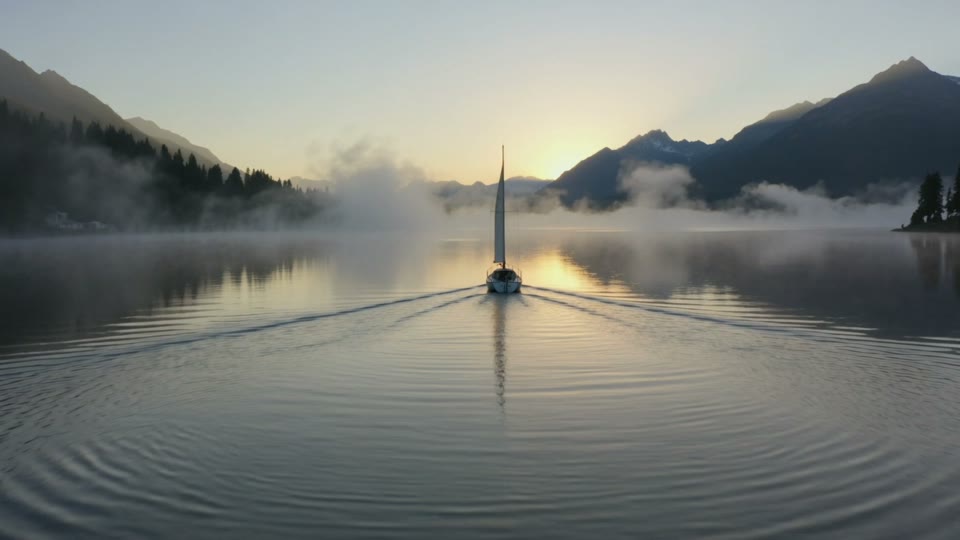
An alpine lake at sunriseSupplied recording · Existing team example from our Kling source site · Kling 3.0 · not generated on ZMS · Text · requested 5s · 1280×720 · 16:9 · actual 5.042s · without sound
Prompt used
Cinematic wide shot of a small ivory sailboat gliding across a calm alpine lake at sunrise. Gentle ripples trail behind the boat, wisps of mist float above the water, distant mountains catch soft golden light. Slow smooth camera push-in, realistic water reflections, natural colors, one continuous shot, no text or logos.
A premium product revealSupplied recording · Existing team example from our Kling source site · Kling 3.0 · not generated on ZMS · Text · requested 5s · 1280×720 · 16:9 · actual 5.042s · without sound
Prompt used
Premium product film of an unbranded amber glass perfume bottle on a cream stone pedestal. The bottle rotates slowly on its vertical axis while warm side lighting creates elegant reflections in the glass. Soft beige studio background, subtle shadow, fixed close-up camera, realistic materials, stable bottle proportions, one continuous shot, no letters or logos.
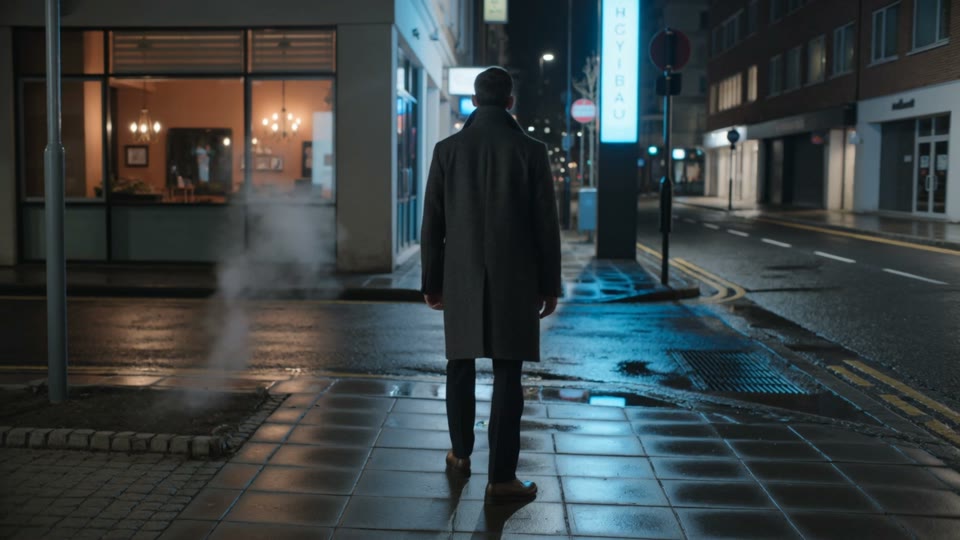
A city scene after the rainSupplied recording · Existing team example from our Kling source site · Kling 3.0 · not generated on ZMS · Text · requested 5s · 1280×720 · 16:9 · actual 5.042s · without sound
Prompt used
Cinematic night street in a modern city after light rain. A lone person in a dark coat walks away from the camera along the sidewalk. Warm café windows and cyan lights reflect in wet pavement, subtle steam drifts from a street vent. Smooth slow tracking camera follows behind, realistic movement, rich contrast, one continuous shot, no readable signs or logos.
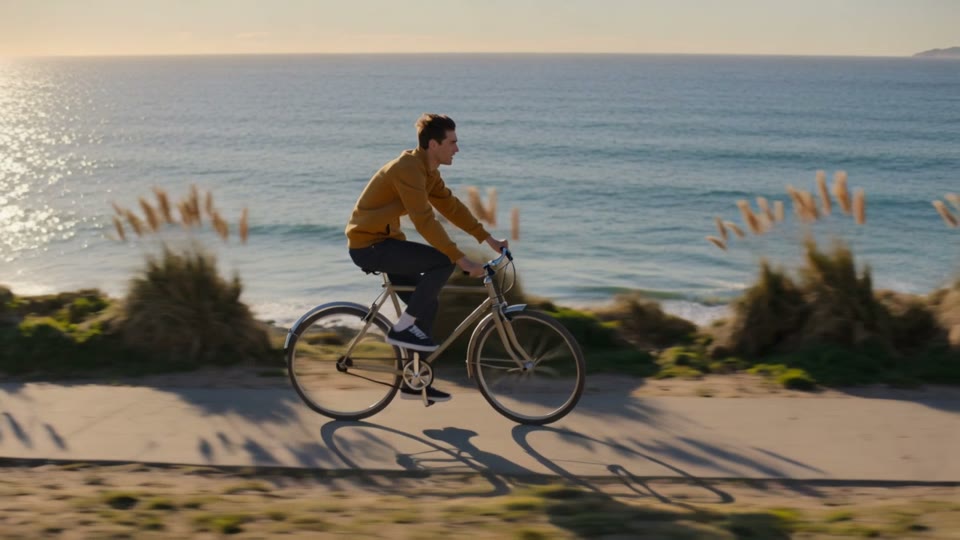
A coastal ride at golden hourSupplied recording · Existing team example from our Kling source site · Kling 3.0 · not generated on ZMS · Text · requested 5s · 1280×720 · 16:9 · actual 5.042s · without sound
Prompt used
Lifestyle film of an adult cyclist in a mustard yellow jacket riding a simple bicycle along a seaside path at golden hour. Smooth side-follow camera keeps the cyclist centered as sunlit grasses move in the breeze and the ocean glitters in the background. Natural pedaling motion, realistic anatomy and bicycle geometry, warm cinematic colors, one continuous shot, no text or logos.
Give Kling 3.0 one subject, a concrete movement, and compatible camera direction. Keep the moving part visible in your source still.
Parameter
Current control
Prepare your shot
Starting input
Text or one JPEG, PNG, or WebP image, up to 10 MiB.
Describe what should move.
Duration and output
5 or 10 seconds; Standard 720p or Pro 1080p, fixed by tier.
Inspect motion through the ending.
Framing
Text: 16:9, 9:16, or 1:1. Image: follows the source crop.
No last frame or multiple references.
Sound and prompt
Without sound; prompt required in both modes.
No sound or resolution selector.
Kling 3.0 Standard, Pro and Credits
Kling 3.0 estimates follow tier and output seconds. A higher rate does not prove better quality. Review your chosen tier and estimate before submitting.
Tier · without sound
Credits per second
5 seconds
10 seconds
Standard
40
200 credits
400 credits
Pro
50
250 credits
500 credits
Check estimates and balance before submission. See ZMS AI pricing
Inspect the cyclist's travel direction. Plan one visible event; add captions later.
A product reveal
Study the perfume clip's silhouette and reflections before planning your own product motion.
A cinematic shot
Check the lake and night-street camera moves. Split unrelated events into separate shots.
How to Use Kling 3.0
Prepare a motion prompt in both modes, then check the complete result.
1
Choose the mode and tier
Select Text or Image, then Standard 720p or Pro 1080p and applicable framing.
2
Add your inputs
Describe subject, action, and camera. Image mode also needs your permitted source still.
3
Check duration and credits
Choose five or ten seconds. Check the estimate and signed-in balance.
4
Review the whole result
Submit, follow the task in Task Center, and check My Creations. Watch the whole clip and keep failed task IDs for support.
Kling 3.0 Prompt Ideas
These Suggested prompts are starting inputs, separate from the recorded examples above. Adapt them to your task.
Suggested inputs you can adapt
3 starter recipes
Text to Video
A social street scene
Use text mode. A side view makes travel direction easy to assess.
Duration
5 seconds
Frame
9:16
Suggested prompt
A cyclist in a yellow raincoat rides past a quiet café at dusk. A steady street-level camera holds a side view as the cyclist crosses the frame. Keep the warm window lights and the background geometry stable. One continuous shot, no text.
Review checkpoint
Check bicycle geometry through the crossing.
Image to Video · your own source image required
A product lighting study
Use image mode with your clear product still; describe movement and details to preserve.
Input
Your own product image
Frame
Follows source image
Suggested prompt
The unbranded bottle stays centered on the table as a soft band of window light moves slowly across the glass. The camera gently pushes closer. Preserve the bottle silhouette, cap, and room layout. No text or logos.
Review checkpoint
Copy, then add your own image. Check reflections and shape.
Text to Video
A landscape reveal
Use a wide text-mode composition with one camera move.
Duration
5 seconds
Frame
16:9
Suggested prompt
A small boat moves slowly across a quiet mountain lake at sunrise. Gentle ripples follow behind it. The camera makes a smooth, slow push toward the boat while the mountains and horizon remain stable. One continuous shot, no text.
Review checkpoint
Check water, reflections, and horizon throughout.
Kling 3.0 FAQ
Can I create a Kling 3.0 video here now?
Yes. Sign in, choose Standard or Pro, and use text or one permitted image. Review the Kling 3.0 credit estimate before submitting, then check the completed clip in your library.
Which image files can I use?
One permitted JPEG, PNG, or WebP image up to 10 MiB. Keep the subject clear.
Do I need a prompt with my image?
Yes. The image supplies appearance; your prompt supplies movement and camera behavior.
Does Kling 3.0 include sound?
Current Standard and Pro workflows are without sound. Add required audio in your editor.
Are the examples ZMS results?
No. They are existing team source-site examples, with no confirmed Standard or Pro tier.
What should I check in a finished clip?
Watch details, motion, geometry, and the ending. Keep failed task IDs. Compare other inputs in the AI video workspace.
Create with Kling 3.0
Return to your Kling 3.0 prompt, source image, and settings.