Kling 4.0 vs Wan 3.0: Tested Side by Side on ZMS AI
Kling 4.0 is cheaper on ZMS and won two of our three tests on planned shots, while Wan 3.0 delivered the most natural motion and is the only one that accepts audio references.

At a Glance
Kling 4.0 | Wan 3.0 | |
|---|---|---|
Developer | Kuaishou | Alibaba |
Resolutions | 720p, 1080p | 480p, 720p, 1080p |
Duration | 3–30 seconds | 2–30 seconds |
Price at 720p / 1080p | 20 / 25 credits per second | 25 / 50 credits per second |
References in one task | 10 images + 5 videos | 10 images + 5 videos + 5 audio clips |
Frame control | First, up to 8 middle, and last frame | First and last frame |
Audio | Audio option | Generate audio toggle |
Won in our tests | Product placement, planned camera move | Physical motion |
Best for | Planned product and brand shots at lower cost | Lifelike action, audio-led videos, 480p drafts |
Meet the Two Models
Kling 4.0 is Kuaishou's latest video model. Its standout on ZMS is control: a Reference mode that mixes images and videos, and a Keyframes mode that lets you pin up to 10 moments in a shot.
Wan 3.0 is the latest model in Alibaba's Wan family. On ZMS it has the widest range of settings of the two: three resolutions from 480p to 1080p, six aspect ratios including adaptive, clips from 2 to 30 seconds, and references that can include audio.
Workflow | Kling 4.0 | Wan 3.0 |
|---|---|---|
Text-to-video | Text to Video | Text to video |
First and last frame | Keyframes (first required, last optional) | Image to video (first required, last optional) |
Frames between start and end | Up to 8 middle keyframes | Not available |
References in one task | Reference: up to 10 images + 5 videos | Mixed references: up to 10 images, 5 videos, 5 audio clips |
New to Wan? Our How to Use Wan 3.0 on ZMS AI guide covers every control.
Where the Credits Go
Kling 4.0 is cheaper at both resolutions the two share: 20 vs 25 credits per second at 720p, and 25 vs 50 at 1080p, so full-HD output on Wan 3.0 costs twice as much. Wan 3.0's 480p tier, at 15 credits per second, is the cheapest option of all for drafts.
Resolution | Kling 4.0 | Wan 3.0 |
|---|---|---|
480p | Not available | 15 credits/second |
720p | 20 credits/second | 25 credits/second |
1080p | 25 credits/second | 50 credits/second |
Generation | Kling 4.0 | Wan 3.0 |
|---|---|---|
5 seconds, 480p | Not available | 75 credits |
5 seconds, 720p | 100 credits | 125 credits |
10 seconds, 1080p | 250 credits | 500 credits |
30 seconds, 1080p | 750 credits | 1,500 credits |
Wan 3.0's price stays the same whether Generate audio is on or off. Adding reference videos raises Kling 4.0's rate to 25 credits per second at 720p and 35 at 1080p, billed on output plus reference length; on Wan 3.0, check the live estimate before adding reference videos or audio.
Four Controls, Compared
Resolution and Length
Both models reach 1080p and 30 seconds, so neither has a ceiling advantage. Wan 3.0 adds a 480p tier for cheap drafts and starts at 2 seconds instead of 3.
Setting | Kling 4.0 | Wan 3.0 |
|---|---|---|
Resolutions | 720p, 1080p | 480p, 720p, 1080p |
Duration | 3–30 seconds | 2–30 seconds |
Reference Material
Both models accept up to 10 images and 5 videos in one task. Wan 3.0's Mixed references mode also takes up to 5 audio clips, which Kling 4.0's Reference mode does not.
If you want a video to follow a sound, a rhythm, or a voice, Wan 3.0 is the only one of the two that can take audio as a reference. For image and video references alone, the two are on equal footing.
Keyframes
Both models can lock the first and last frame of a shot. Kling 4.0 goes further: its Keyframes mode also accepts up to 8 middle frames, up to 10 in total, so you can plan several stages of a move. Wan 3.0 takes a required first frame and an optional last frame, and leaves everything in between to the prompt.
Audio
Both models can generate sound with the video. Wan 3.0 has a Generate audio toggle you can switch off when you plan to add your own music or voiceover, and turning it on does not change the price. Kling 4.0 offers an audio option in its settings. Only Wan 3.0 accepts audio files as references.
Side-by-Side Tests
We gave both models the same prompt, images, and settings in three tests: physical motion, product placement from references, and a planned multi-stage shot.
Test | Kling 4.0 mode | Wan 3.0 mode | Kling cost | Wan cost |
|---|---|---|---|---|
1. Dog shaking off water | Text to Video | Text to video | 100 credits | 125 credits |
2. Backpack by a waterfall | Reference (2 images) | Mixed references (2 images) | 100 credits | 125 credits |
3. Bakery reveal | Keyframes (3 frames) | Image to video (first + last frame) | 100 credits | 125 credits |
Test 1: Physical Motion – Dog Shaking Off Water
Settings (both models): Text to video · 5 seconds · 720p · 16:9 · audio on
Prompt: A golden retriever climbs out of a lake onto a wooden dock and shakes off the water. Droplets spray outward in the low afternoon sun, and its ears and fur swing with the motion. The camera stays low at dock level.
What we checked: how believable the shake looks (fur, ears, water spray), whether the dog's anatomy holds up during fast motion, and whether the audio matches the splash and shake.
Kling 4.0: The dog starts already at the edge of the dock instead of climbing out, and the shot jumps to a much closer framing for the shake. Water drips and sprays convincingly from the backlit fur, but most of the movement is in the head and neck rather than a full-body shake.
Wan 3.0: Followed the prompt beat by beat. The dog climbs out of the lake with a splash, shakes hard enough to flap its ears and throw droplets, then settles, while the camera stays low on the dock. Its anatomy held up through the fast motion.
Edge: Wan 3.0, clearly. It was the only one to show the whole action the prompt described.
Test 2: Image References – Backpack by a Waterfall
Settings (both models): 5 seconds · 720p · 16:9
References: a product photo of a tan leather backpack and a photo of a mossy rock beside a mountain waterfall.
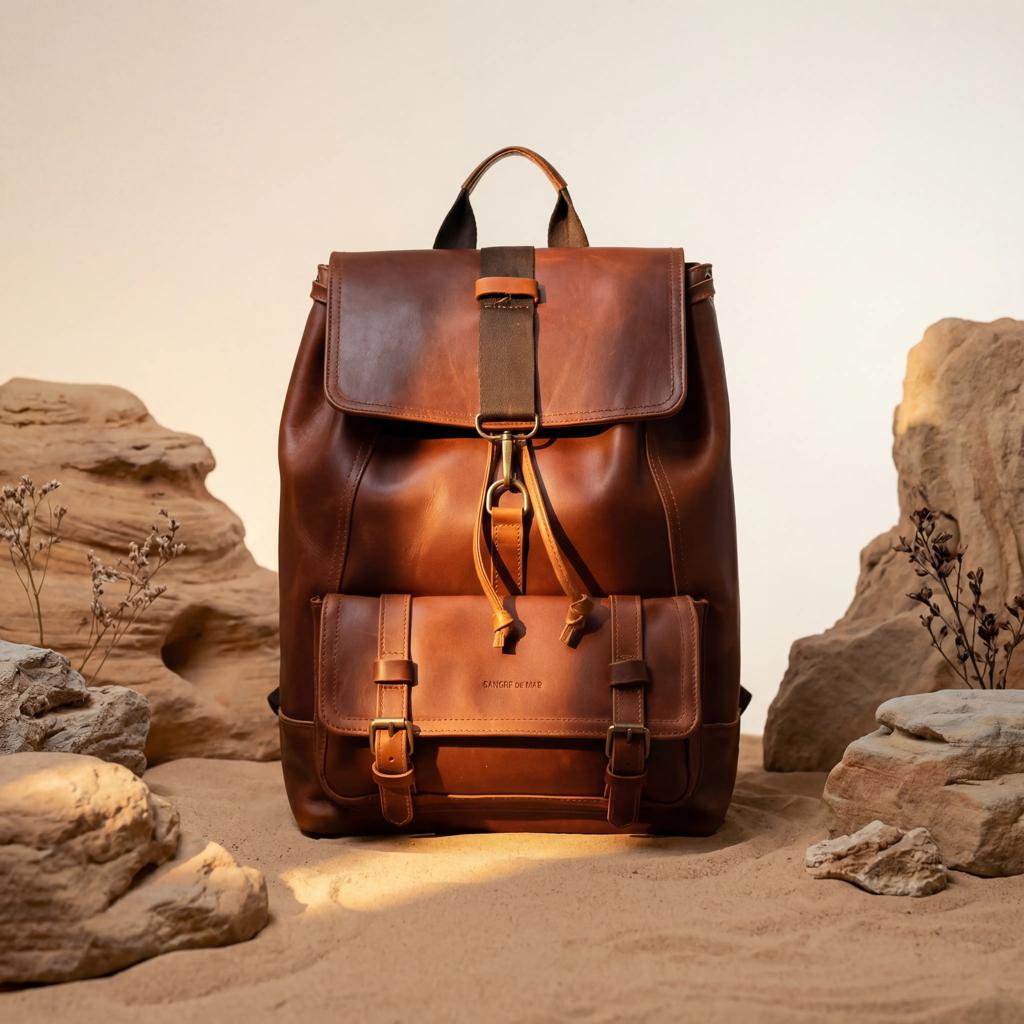
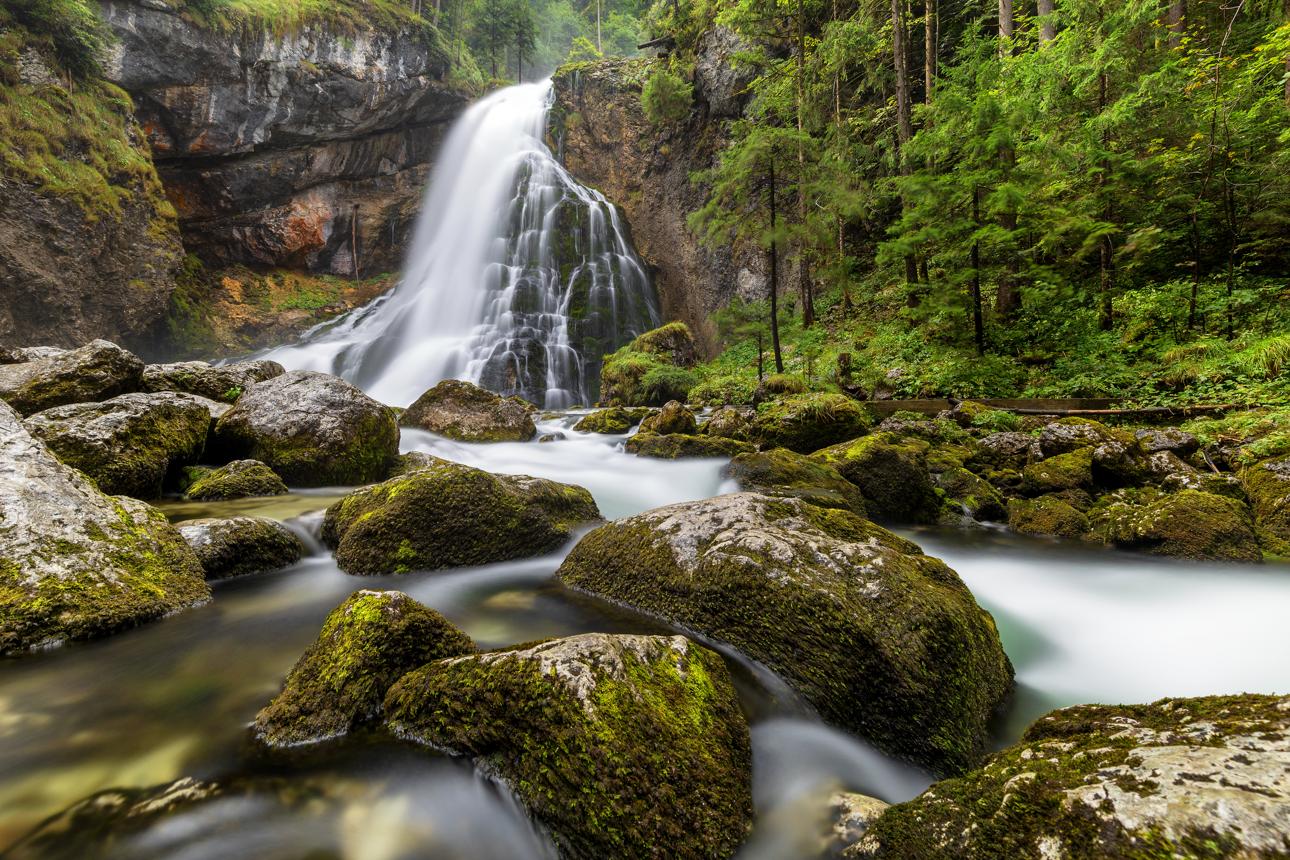
Prompt: Place the backpack from the first image on the mossy rock from the second image. Mist drifts from the waterfall behind it, and the camera slowly pushes in toward the backpack's front buckle.
What we checked: whether the backpack's shape, stitching, and buckle match the product photo, whether the waterfall setting carries over, and how the mist interacts with the subject.
Kling 4.0: A near-ideal result. The backpack sits on the mossy rock in front of the waterfall from the first frame, mist drifts behind it, and the camera pushes in to finish on the front buckle as asked. The clasp, straps, and stitching stay sharp in the close-up.
Wan 3.0: Opened on the product photo's own studio background, then cross-dissolved into the waterfall scene, leaving a ghosted double exposure for about a second. After the transition, the backpack sat convincingly on the rock and the push-in worked. The clip also came out square, because Mixed references defaults to an adaptive aspect ratio; choose 16:9 yourself if you need widescreen.
Edge: Kling 4.0. It placed the product in the scene from the start, with no transition artifacts.
Test 3: Shot Planning – Bakery Reveal
Settings (both models): 5 seconds · 720p · 16:9
Kling 4.0 input: three ordered keyframes – the bakery storefront at dawn seen from the street, the counter inside with trays of pastries, and a close-up of a croissant being lifted from a tray.
Wan 3.0 input: the first and third keyframes as the first and last frame in Image to video mode, with a prompt describing the move between them: the camera walks through the door, past the counter, and ends on a close-up of a croissant being lifted from a tray.
What we checked: whether each model passes the counter on its way to the final shot, and whether the bakery, lighting, and pastries stay consistent through the move. This shows what Kling 4.0's middle keyframe adds over a start and end frame alone.
Tip: Generate all three keyframe images in one session with the same style prompt. Mismatched keyframes cause visible jumps in Kling 4.0's output.
Kling 4.0 (3 keyframes): Moved continuously from the storefront, through the glass door, along the counter, and down to the croissant being lifted with tongs. The middle keyframe did its job: the counter shot appears as planned, and the pastries and price cards stay consistent throughout.
Wan 3.0 (first + last frame): Started and ended on the right frames, and its final croissant close-up is excellent. In between, it invented its own route: a baker walks into the shop, then the scene cuts inside instead of the camera moving through the door, so the middle reads as an edit rather than one continuous shot.
Edge: Kling 4.0. The middle keyframe gave it a smoother, more controlled path to the same ending.
Test Results
Kling 4.0 won two of the three tests and cost less in all three; Wan 3.0 won the motion test outright.
Test | Stronger result |
|---|---|
1. Dog shaking off water | Wan 3.0 (showed every beat of the action) |
2. Backpack by a waterfall | Kling 4.0 (clean placement, no transition artifacts) |
3. Bakery reveal | Kling 4.0 (middle keyframe kept the move continuous) |
Wan 3.0 was stronger at natural, physical motion from a text prompt. Kling 4.0 was more reliable whenever the shot had to follow a plan, from putting a product in a scene to moving the camera through set stages.
Which One Should You Use?
Project | Pick | Why |
|---|---|---|
Product videos and ads | Kling 4.0 | Placed the product cleanly in our test, and 1080p costs half as much |
Shots planned in stages | Kling 4.0 | Middle keyframes; Wan 3.0 fixes only the start and end |
Animals, people, and physical action | Wan 3.0 | Most complete, natural motion in our tests |
Videos driven by music or voice | Wan 3.0 | The only one that takes audio references |
Cheap drafts | Wan 3.0 | 480p at 15 credits per second |
FAQ
Is Kling 4.0 better than Wan 3.0?
For most planned shots, yes. Kling 4.0 won our product-placement and keyframe tests and costs less. Wan 3.0 won our motion test and is the better pick for lifelike action or audio-led videos.
Which is cheaper on ZMS?
Kling 4.0. It costs 20 credits per second at 720p versus 25 for Wan 3.0, and 25 versus 50 at 1080p. Wan 3.0's 480p tier, at 15 credits per second, is the cheapest option for drafts.
Do both models support first and last frames?
Yes. Wan 3.0 does it in Image to video mode, with a required first frame and an optional last frame. Kling 4.0's Keyframes mode can also add up to 8 frames in between.
Which model accepts audio references?
Only Wan 3.0. Its Mixed references mode takes up to 5 audio clips alongside up to 10 images and 5 videos.
Does turning on Generate audio cost more on Wan 3.0?
No. The price stays the same whether Generate audio is on or off.
Why did my Wan 3.0 video come out square?
Mixed references defaults to an adaptive aspect ratio, which can follow your reference images. Choose 16:9, 9:16, or another ratio in the output settings before you generate.
How long can videos be?
Kling 4.0 generates 3 to 30 seconds and Wan 3.0 generates 2 to 30 seconds.
The Verdict
Make Kling 4.0 your default on ZMS. It costs less at every shared resolution, half as much at 1080p, and its keyframes keep planned shots on track.
Reach for Wan 3.0 when the action itself is the point, or when a soundtrack or voice should shape the video. For those jobs, its extra cost at 720p is small.