MiniMax H3
MiniMax H3 vs Wan 3.0: AI Video Model Comparison
A side-by-side comparison of MiniMax H3 and Wan 3.0 on ZMS AI — resolution, duration range, reference capacity, and native audio — to help you pick the right model.
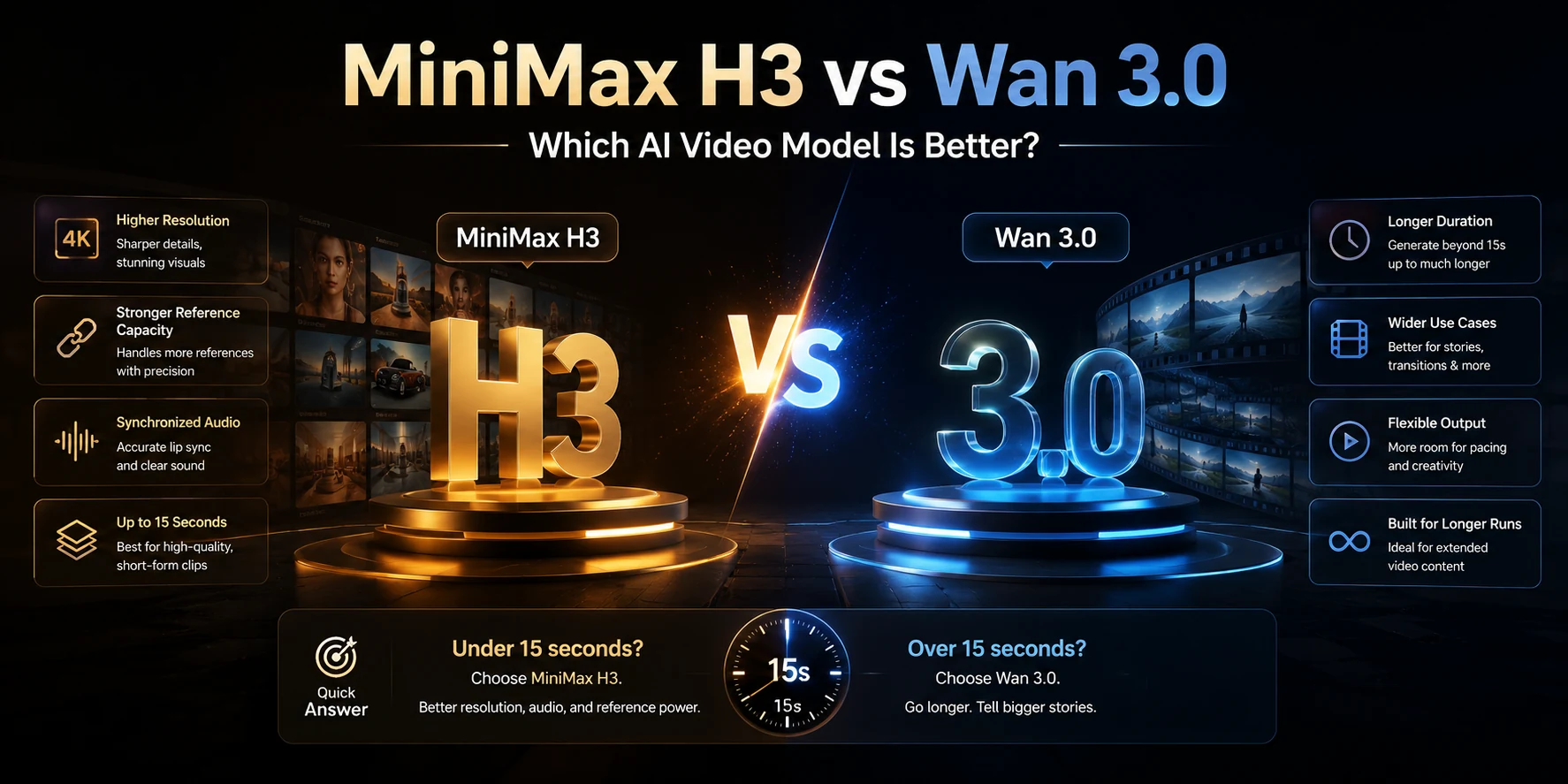
MiniMax H3 and Wan 3.0 are both AI video generation models available on ZMS AI, but they offer different strengths. MiniMax H3 provides higher maximum resolution, more reference inputs, and dedicated first-and-last-frame control. Wan 3.0 offers a longer duration range, extending up to 30 seconds.
But specifications only tell part of the story.
To understand how these differences affect actual results, we tested both models on ZMS AI using six practical video generation scenarios: a luxury watch advertisement, a gallery tracking shot, an espresso commercial, a mixed-reference sports car scene, a cinematic desert highway, and a first-and-last-frame transition.
This comparison combines the available workspace settings with 12 generated videos, examining what worked, what differed, and where limitations appeared.
Quick answer: Choose Wan 3.0 when you need a single generated clip longer than 15 seconds. Choose MiniMax H3 when your workflow requires a higher resolution ceiling, more reference inputs, a fixed 21:9 aspect ratio, or defined first-and-last-frame inputs. Our tests also show that neither model consistently outperformed the other in every visual category.
MiniMax H3 vs Wan 3.0: Key Specs Compared
Spec | MiniMax H3 | Wan 3.0 |
|---|---|---|
Resolution | 768p, 2K | 480p, 720p, 1080p |
Duration | 4–15 seconds | 2–30 seconds |
Audio generation | Audio present in tested outputs; no separate toggle shown | Generate Audio toggle |
Aspect ratios | 21:9, 16:9, 4:3, 1:1, 3:4, 9:16 | Adaptive, 16:9, 9:16, 1:1, 4:3, 3:4 |
Reference inputs | Up to 10 images or 5 videos displayed in Mixed References | Up to 3 mixed references |
First/last frame | Dedicated First / Last Frame mode | Single starting image in tested Image to Video mode |
Maximum clip length | 15 seconds | 30 seconds |
These figures reflect the settings observed in the ZMS AI workspace during our October 2026 tests. The MiniMax H3 image and video reference limits are displayed separately; their combined maximum was not independently verified.
MiniMax H3 vs Wan 3.0: Key Differences Explained
1. Resolution: MiniMax H3 Wins on Maximum Output Size
MiniMax H3 offers a 2K output option in the ZMS AI workspace, while Wan 3.0 tops out at 1080p.
This gives MiniMax H3 a higher maximum resolution setting, although more pixels do not automatically guarantee better visual details.
Our Hands-On Resolution Test
We generated the same luxury wristwatch advertisement with both models, using a five-second duration and their closest available lower-resolution settings.
Test Prompt
A cinematic macro shot of a luxury wristwatch resting on a dark stone surface. The camera slowly moves closer, revealing the brushed stainless steel case, polished edges, black leather strap, and detailed watch dial. Soft directional studio lighting creates realistic reflections on the metal surface. The watch remains stationary while the camera performs a smooth, slow push-in. Photorealistic textures, premium commercial cinematography, stable watch geometry, no scene cuts, no text overlays.
Test Settings
Setting | MiniMax H3 | Wan 3.0 |
|---|---|---|
Mode | Text to Video | Text to Video |
Resolution | 1344 × 768 | 1280 × 720 |
Duration | 5.17s | 5.04s |
Frame rate | 24fps | 30fps |
MiniMax H3 — Actual Video Output
MiniMax H3 generated a relatively fixed, front-facing watch composition. The dial markers, subdials, and metallic case remained recognizable in the inspected frames, although a strong reflection appeared across the watch face toward the end.
Wan 3.0 — Actual Video Output
Wan 3.0 produced a more noticeable camera push-in from an angled perspective. The metallic edges and watch dial remained recognizable, while stronger highlights emphasized the case.
What We Observed
Both models generated detailed product shots. MiniMax H3 produced a slightly larger output image, while Wan 3.0 demonstrated more pronounced camera movement.
The differences in framing and lighting make it difficult to attribute perceived sharpness to resolution alone.
Verdict: MiniMax H3 wins on maximum available resolution. However, this 768p-versus-720p test did not establish a clear winner for actual detail quality. A separate 2K-versus-1080p test would be required to compare their highest-resolution outputs directly.
2. Duration: Wan 3.0 Wins
Wan 3.0 supports video durations from 2 to 30 seconds, while MiniMax H3 supports 4 to 15 seconds in the tested workspace.
This makes Wan 3.0 more flexible for longer continuous scenes.
Our Hands-On Duration Test
We generated a continuous tracking shot of a woman walking through a modern art gallery toward a large window.
Both models received the same prompt, but MiniMax H3 generated a 15-second video while Wan 3.0 generated a 20-second video.
Test Prompt
A cinematic continuous tracking shot of a young woman wearing a beige trench coat walking slowly through a modern art gallery. She passes several large abstract paintings displayed on white walls, then approaches a tall floor-to-ceiling window overlooking a sunlit garden. The camera smoothly follows her from behind at a consistent distance. Natural walking motion, realistic body proportions, stable facial appearance and clothing, soft daylight, consistent gallery architecture, photorealistic cinematography, one continuous shot, no cuts, no text.
Test Settings
Setting | MiniMax H3 | Wan 3.0 |
|---|---|---|
Mode | Text to Video | Text to Video |
Resolution | 768p | 720p |
Actual duration | 15.08s | 20.00s |
Aspect ratio | Approximately 16:9 | 16:9 |
MiniMax H3 — Actual Video Output
MiniMax H3 generated a continuous scene following a woman through a modern gallery.
The character moved toward the window, while the paintings and surrounding architecture remained recognizable throughout the sampled frames.
By the later part of the clip, the woman had reached the window area.
Wan 3.0 — Actual Video Output
Wan 3.0 generated a longer sequence following a similarly dressed woman through the gallery.
The camera continued tracking the character beyond the 15-second mark, with the clothing and surrounding environment remaining broadly consistent.
What We Observed
Both models generated recognizable continuous scenes with relatively stable character appearances.
MiniMax H3 completed the main movement within approximately 15 seconds, while Wan 3.0 continued the action across 20 seconds.
The longer duration gave Wan 3.0 additional room to develop the scene, although it did not automatically create a more complete narrative.
Verdict: Wan 3.0 wins on duration flexibility. Our test confirmed that it can generate a 20-second continuous scene while maintaining broadly recognizable character and environmental details. MiniMax H3 also produced a coherent 15-second output, so this result demonstrates a duration advantage rather than universally better motion quality.
3. Audio Generation: Both Models Produce Audio
Both MiniMax H3 and Wan 3.0 can generate videos containing audio, but their controls differ in the ZMS AI workspace.
MiniMax H3 did not display a separate audio toggle in our tested interface, while Wan 3.0 provided a Generate Audio option.
Our Hands-On Audio Test
To compare their audio-generation workflows, we created the same five-second espresso-making scene.
The prompt included coffee flowing into a ceramic cup, brewing sounds, rising steam, and a metal spoon being placed on a saucer.
Test Prompt
A cinematic close-up of a professional espresso machine in a modern café. The machine begins brewing coffee, and a stream of dark espresso flows into a white ceramic cup with a realistic brewing sound. Soft steam rises as the coffee pours. Near the end, a barista gently places a metal spoon on the saucer, producing a clear metallic clink. Natural café ambience, realistic synchronized sound effects, smooth camera movement, photorealistic details, one continuous shot, no dialogue, no music, no scene cuts.
Test Settings
Setting | MiniMax H3 | Wan 3.0 |
|---|---|---|
Mode | Text to Video | Text to Video |
Resolution | 768p | 720p |
Duration | Approximately 5s | Approximately 5s |
Audio control | No separate toggle shown | Generate Audio enabled |
Exported audio track | AAC | AAC |
MiniMax H3 — Actual Video Output
MiniMax H3 generated a close-up espresso scene with coffee flowing into a white ceramic cup. A hand holding a spoon appeared near the end.
The exported video contained an AAC audio track despite the absence of a separate audio toggle.
Wan 3.0 — Actual Video Output
Wan 3.0 generated a similar espresso-making sequence, with visible coffee flow, steam, and a spoon appearing toward the end.
Its exported video also contained an AAC audio track.
What We Observed
Both models generated the main visual actions described in the prompt and exported video files containing audio tracks.
However, the presence of an audio track does not prove accurate synchronization. The timing of brewing sounds and spoon contact would require closer audio inspection before declaring either model more precise.
Verdict: Both models support audio output in our tested workflows. MiniMax H3 generated an audio-containing video without a separate toggle, while Wan 3.0 generated one with its audio option enabled. Neither can be declared the winner for synchronization precision based on the evidence verified so far.
4. Reference Images and Files: MiniMax H3 Wins on Capacity
MiniMax H3 offers greater reference-input capacity in the tested ZMS AI workspace.
Its Mixed References interface displays limits of up to 10 reference images and 5 reference videos, while Wan 3.0’s recorded Mixed References limit is up to 3 inputs.
These are displayed upload limits, not a verified combined file allowance. Audio-reference support was not confirmed in this test.
Our Hands-On Mixed References Test
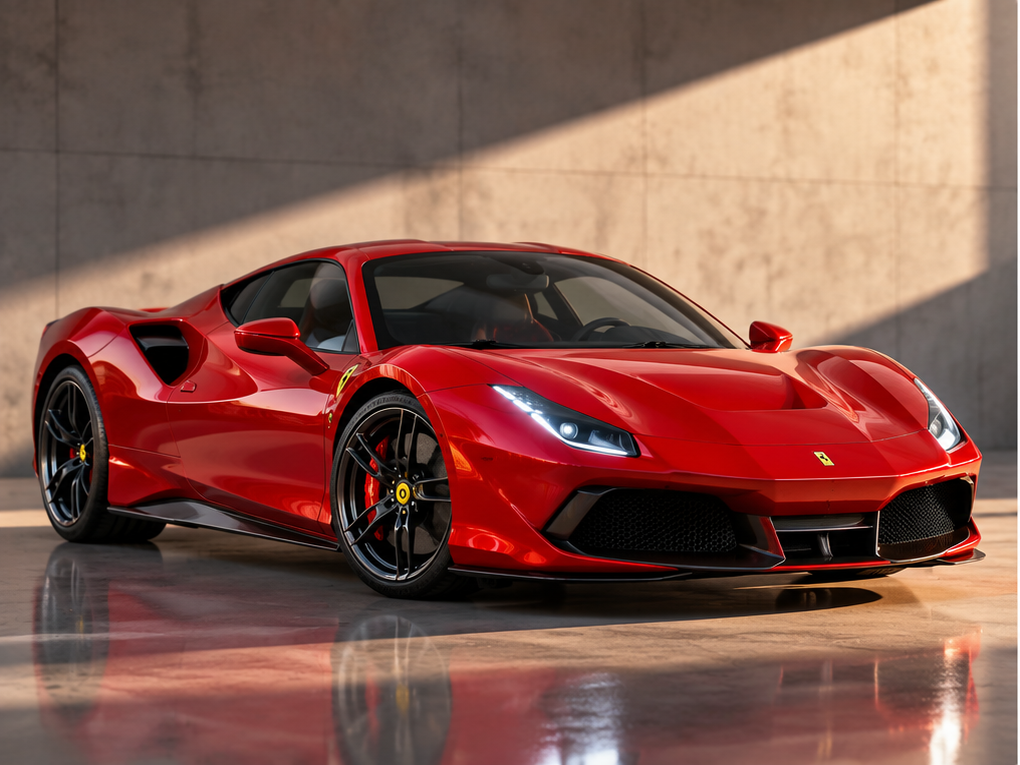
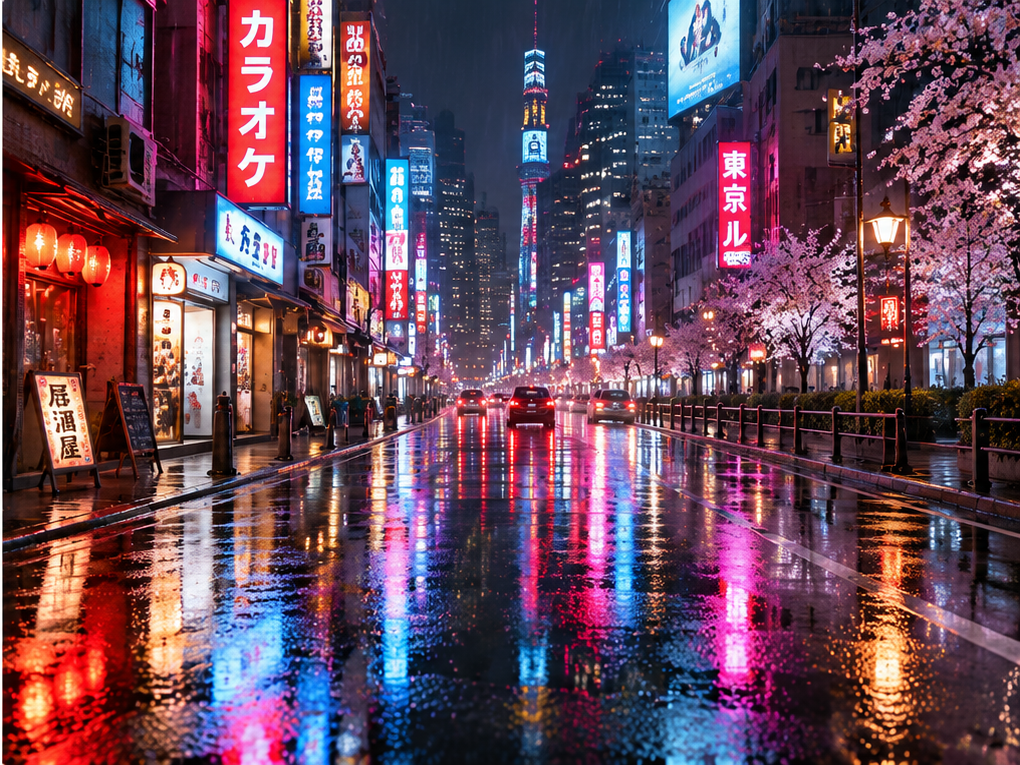
We uploaded two reference images: a red luxury sports car in a studio and a neon-lit Tokyo street at night.
Both models received the same prompt asking them to preserve the car’s design while placing it in the rainy city environment.
Test Prompt
Create a cinematic commercial video featuring the exact red sports car from the first reference image, driving slowly through the rainy Tokyo street shown in the second reference image. Preserve the car’s original design, red paint, headlights, and wheels. Match the neon lighting, wet pavement, and urban atmosphere of the second reference. Smooth tracking camera movement, realistic reflections, stable vehicle geometry, no scene cuts.
Test Settings
Setting | MiniMax H3 | Wan 3.0 |
|---|---|---|
Mode | Mixed References | Mixed References |
Reference images | 2 | 2 |
Actual resolution | 1344 × 768 | 1280 × 720 |
Actual duration | 5.17s | 5.04s |
MiniMax H3 — Actual Video Output
MiniMax H3 combined the red sports car with the rainy Tokyo street environment.
The generated scene included neon signs, illuminated buildings, cherry blossom trees, and reflections across the wet pavement.
The camera perspective shifted from a nearly frontal view toward a more angled perspective, revealing more of the car’s side.
Wan 3.0 — Actual Video Output
Wan 3.0 also integrated the sports car into the Tokyo night scene.
The output preserved the recognizable red body, headlights, wheels, and low-profile silhouette. Neon reflections and surrounding buildings remained visible throughout the sampled frames.
Compared with MiniMax H3, the camera perspective was relatively restrained.
What We Observed
Both models successfully combined the product and environment references into coherent scenes.
MiniMax H3 produced a more noticeable change in camera perspective, while Wan 3.0 maintained a relatively consistent angled composition.
Neither result conclusively demonstrated that the car completed the requested driving motion. Camera movement and object movement can produce similar changes in perspective.
Verdict: MiniMax H3 wins on available reference-input capacity, while both models successfully integrated the two visual references.
The test demonstrates that both models can combine a product image with an environment image. It does not establish a clear winner for reference accuracy across more complex tasks.
5. Aspect Ratio: A Split Decision
MiniMax H3 offers a dedicated 21:9 aspect ratio, making it useful for cinematic widescreen videos and ultra-wide website banners.
Wan 3.0 does not offer 21:9 as a fixed option in the compared workspace, but it includes an Adaptive setting that automatically selects an output ratio.
Our Hands-On Aspect Ratio Test
We generated the same cinematic desert highway scene using both models.
MiniMax H3 was set to 21:9, while Wan 3.0 used Adaptive. Both videos were generated with the same prompt and a five-second duration.
Test Prompt
A cinematic panoramic shot of a red sports car driving slowly along an empty desert highway at sunset. Vast golden sand dunes stretch across both sides of the road, with distant mountains beneath a dramatic orange and purple sky. The camera smoothly tracks the car from a low front-side angle, revealing the expansive desert landscape. Wide cinematic composition, realistic vehicle motion, natural lighting, detailed road textures, stable car geometry, photorealistic cinematography, one continuous shot, no cuts, no text.
Test Settings
Setting | MiniMax H3 | Wan 3.0 |
|---|---|---|
Mode | Text to Video | Text to Video |
Selected aspect ratio | 21:9 | Adaptive |
Actual resolution | 1536 × 672 | 1280 × 720 |
Actual aspect ratio | Approximately 21:9 | 16:9 |
Duration | 5.17s | 5.00s |
MiniMax H3 — Actual Video Output
MiniMax H3 successfully generated an ultra-wide video measuring 1536 × 672 pixels.
The red sports car remained fully visible as the camera tracked its movement along the desert highway. The wide frame emphasized the horizontal landscape, including distant mountains, sand dunes, and the surrounding road.
However, the output featured relatively dark lighting and less visible sky compared with Wan 3.0.
Wan 3.0 — Actual Video Output
Wan 3.0’s Adaptive mode produced a 1280 × 720 video, corresponding to a standard 16:9 aspect ratio.
The generated scene featured a red sports car traveling along a desert highway, with a prominent sunset, colorful clouds, sand dunes, and a winding road.
The composition emphasized the surrounding environment, with more visible sky and brighter sunset lighting than the MiniMax H3 output.
What We Observed
Both models maintained the sports car within the frame and generated recognizable desert highway scenes.
MiniMax H3 delivered the requested ultra-wide format directly, while Wan 3.0 automatically selected 16:9.
The visual differences reflect both the selected framing options and each model’s interpretation of the prompt.
Verdict: A Split Decision. MiniMax H3 wins for direct 21:9 output support, while Wan 3.0 offers the convenience of adaptive framing. The better option depends on whether your project requires a specific aspect ratio or benefits from automatic framing.
6. First-and-Last-Frame Control: MiniMax H3 Wins on Input Control
MiniMax H3 supports a dedicated First / Last Frame mode in the ZMS AI workspace, allowing users to provide both an opening image and a target closing image.
Wan 3.0’s Image to Video mode accepts a starting image but does not provide an equivalent last-frame input in the tested interface.
Our Hands-On First-and-Last-Frame Test
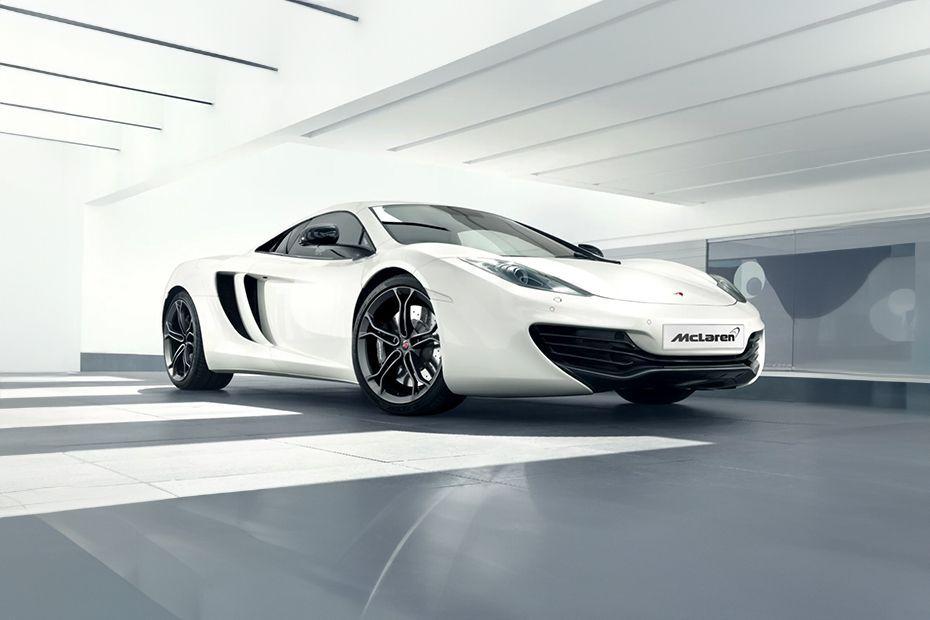
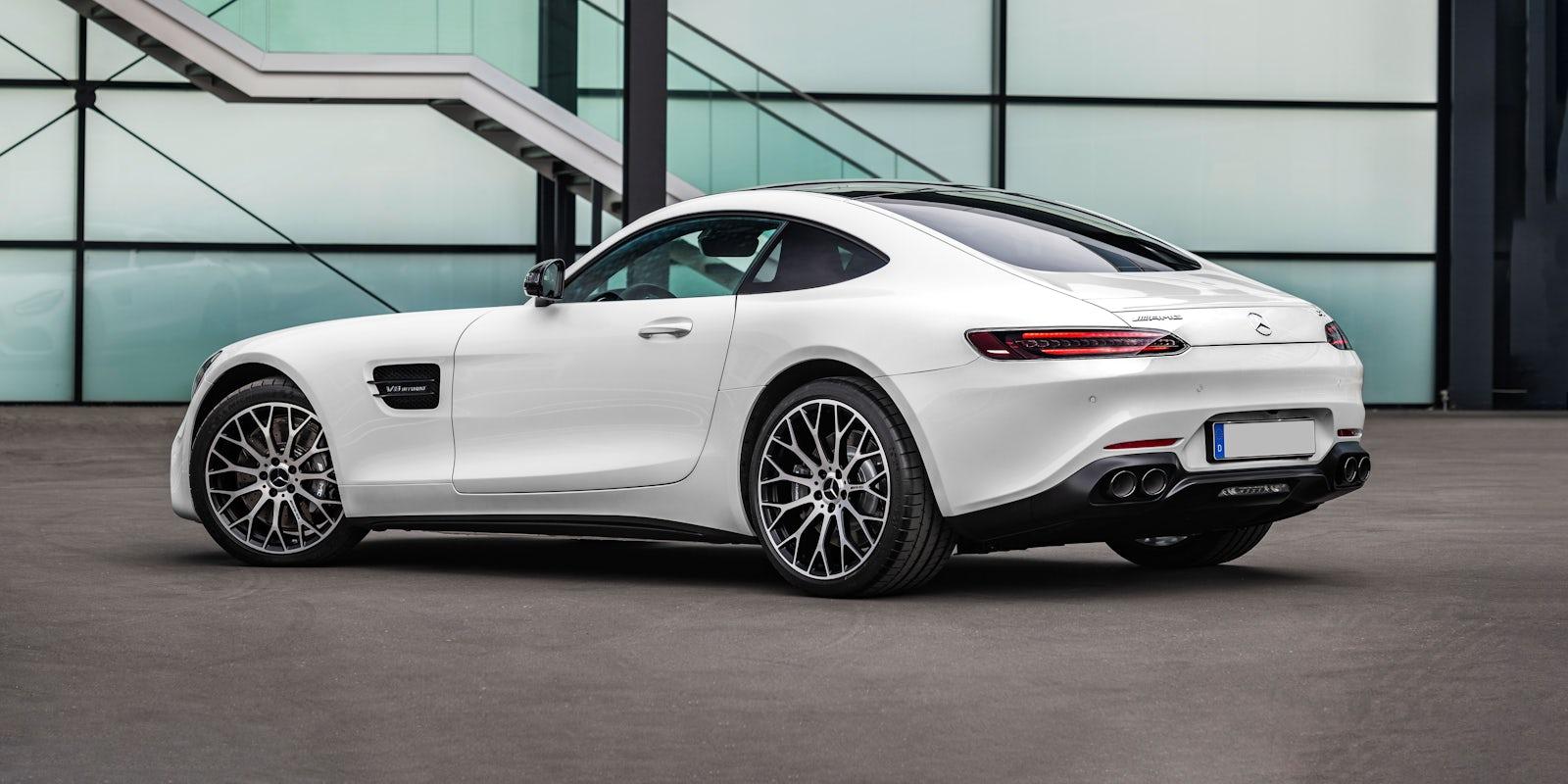
We created an automotive commercial featuring a white sports car inside a modern showroom.
The goal was to move the camera smoothly from a front three-quarter view to a rear three-quarter view while preserving the car’s design and surrounding environment.
MiniMax H3 received both an opening and a closing reference frame. Wan 3.0 received the opening frame and the same motion prompt.
Test Prompt
A cinematic automotive commercial featuring a stationary white luxury sports car inside a modern glass showroom. The camera smoothly orbits around the vehicle, transitioning from a front three-quarter view to a rear three-quarter view. Preserve the exact car design, body proportions, wheel style, paint color, and showroom environment throughout the shot. Realistic reflections, smooth continuous camera movement, premium commercial lighting, no cuts, no text.
Test Settings
Setting | MiniMax H3 | Wan 3.0 |
|---|---|---|
Mode | First / Last Frame | Image to Video |
Reference input | Opening and closing images | Opening image only |
Actual resolution | 1152 × 768 | 1280 × 720 |
Actual duration | 5.17s | 5.04s |
MiniMax H3 — Actual Video Output
MiniMax H3 began with a front three-quarter view of a white sports car and transitioned through several camera angles toward a rear-side view.
The model demonstrated the intended perspective change, but the car’s design details and showroom background changed noticeably during the transition.
The result illustrates the availability of first-and-last-frame control without proving perfect preservation of the reference images.
Wan 3.0 — Actual Video Output
Wan 3.0 also generated a smooth camera orbit from the car’s front-side perspective toward the rear.
Despite receiving only the opening reference image, the model followed the motion instruction and maintained a relatively consistent vehicle appearance in the inspected frames.
Its ending composition was guided by the prompt rather than a user-supplied closing image.
What We Observed
Both models generated a recognizable camera orbit around a stationary white sports car.
MiniMax H3 offered more explicit control over the intended opening and closing compositions, while Wan 3.0 relied on natural-language instructions to determine the final view.
In this test, Wan 3.0 maintained a more consistent vehicle appearance, while MiniMax H3 showed greater variation in vehicle details and background architecture.
Verdict: MiniMax H3 wins on first-and-last-frame input control.
Its dedicated mode is useful for planned transitions and storyboard-based workflows. However, our test also showed that providing two reference frames does not guarantee perfect visual consistency between them.
Which Model Should You Use?
Based on the available settings and our six hands-on tests, the choice often comes down to a specific production requirement rather than an overall better model.
Quick Verdict: Test Results
Comparison | Winner | Hands-On Finding |
|---|---|---|
Resolution | MiniMax H3 (specs) | Higher resolution ceiling; no clear winner for actual detail |
Duration | Wan 3.0 | Successfully generated a 20-second continuous scene |
Audio Generation | No clear winner | Both exported audio tracks; precise synchronization not verified |
Reference Inputs | MiniMax H3 (capacity) | Both combined the car and Tokyo references successfully |
Aspect Ratio | Split decision | MiniMax H3 generated ultra-wide output; Wan 3.0 selected 16:9 |
First/Last Frame | MiniMax H3 (control) | Supports two endpoint images; Wan 3.0 showed relatively stable car geometry |
Choose Wan 3.0 When:
Your video needs to run longer than 15 seconds.
You need a quick 2–3-second transition.
You want to combine a small number of visual references.
You prefer a straightforward single-image-to-video workflow.
You want to experiment with automatically selected framing.
Choose MiniMax H3 When:
Your project requires the available 2K resolution option.
You need to upload more visual reference assets.
You want a fixed 21:9 cinematic aspect ratio.
You need to specify both opening and closing frames.
Your video fits within the 15-second duration limit.
For example, our 20-second gallery test demonstrated Wan 3.0’s advantage for longer continuous shots. Meanwhile, MiniMax H3’s dedicated first-and-last-frame mode offered more direct control over a planned camera transition, even though its generated vehicle details were not perfectly consistent.
For product advertisements, both models produced usable visual results in our tests. The better choice depends on whether your priority is output resolution, motion, composition, or reference control.
How Prompting Differs Between the Two Models
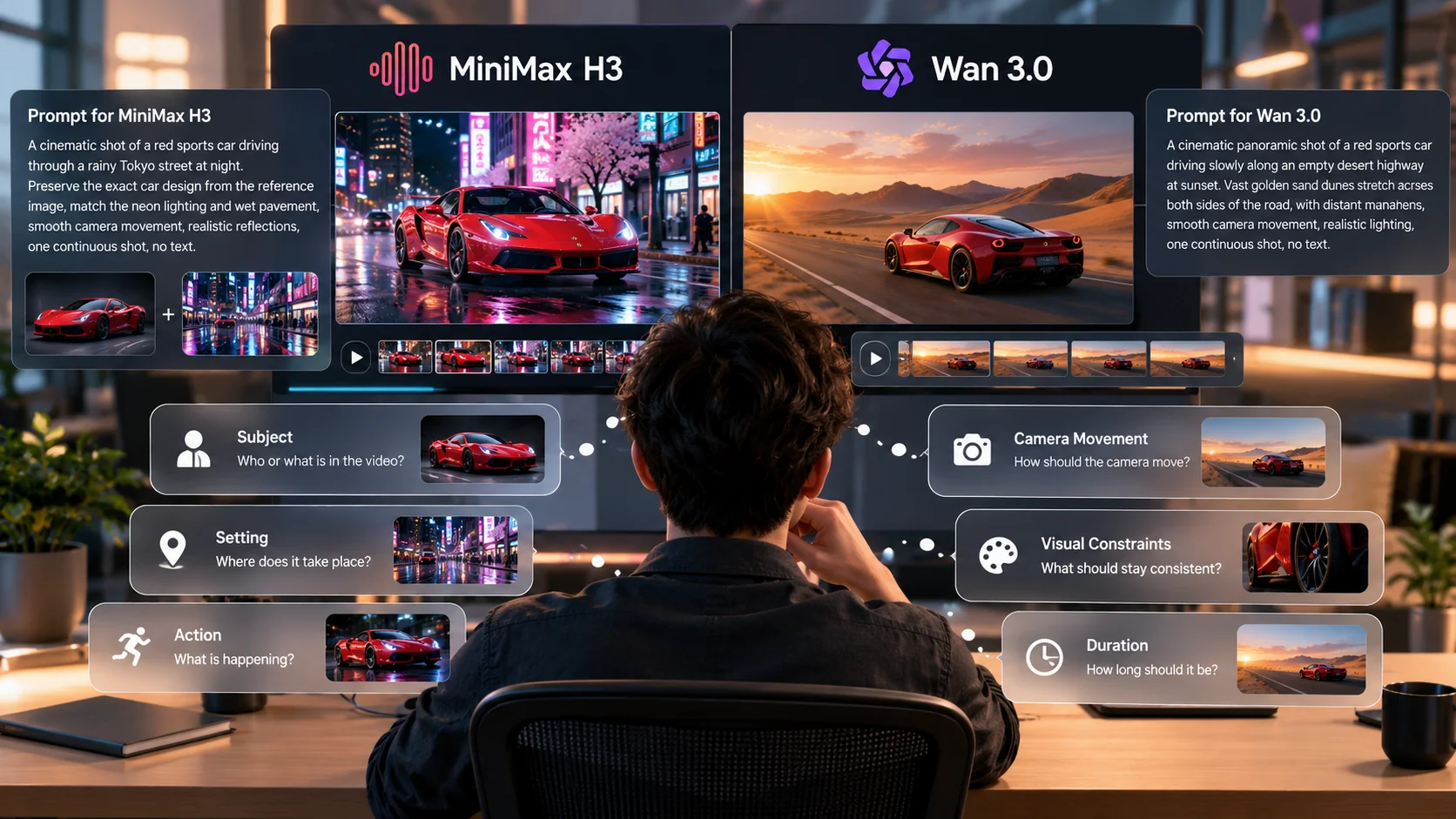
Both models respond to prompts describing the subject, setting, action, camera movement, and visual constraints.
However, our tests suggest several practical differences worth considering.
For MiniMax H3, be specific about the role of each reference image when using Mixed References. In our Tokyo sports car test, the model successfully combined the vehicle and street environment, but the resulting camera movement did not conclusively demonstrate the requested driving action.
For first-and-last-frame generation, describe the transition between the supplied images. Avoid relying entirely on the endpoint references to determine how the camera should move.
For Wan 3.0, adjust the prompt to match the selected duration. Our 20-second gallery test showed that a simple walking instruction can produce a continuous scene, but additional narrative beats may help make longer videos more purposeful.
For image-to-video generation, describe the desired camera movement explicitly. In our showroom test, Wan 3.0 generated a recognizable orbit around the car without requiring a closing reference frame.
Practical prompting tip: Use one clear primary action, define the camera movement, and specify which visual elements must remain stable. This makes it easier to evaluate whether the model followed the instruction.
MiniMax H3 vs Wan 3.0 FAQ
Is MiniMax H3 better than Wan 3.0?
Neither model won every category in our hands-on comparison. MiniMax H3 offers a higher resolution ceiling, greater displayed reference capacity, and dedicated first-and-last-frame control. Wan 3.0 offers longer video durations and a lower minimum duration.
What is the maximum video length for MiniMax H3 vs Wan 3.0?
In the tested ZMS AI workspace, MiniMax H3 supports 4–15 seconds, while Wan 3.0 supports 2–30 seconds. Our hands-on duration test generated a 15.08-second MiniMax H3 video and a 20-second Wan 3.0 video.
Which model has higher resolution?
MiniMax H3 offers a 2K output setting, compared with Wan 3.0’s 1080p maximum in the tested workspace. However, our lower-resolution wristwatch test did not establish a clear winner for actual visual detail.
Can I use both MiniMax H3 and Wan 3.0 on ZMS AI?
Yes. Both models are available in the ZMS AI Video Generator, allowing creators to switch models without moving to another video generation platform.
Does MiniMax H3 or Wan 3.0 handle audio better?
Both models generated videos containing audio tracks in our espresso test. However, we did not establish which model provides more accurate synchronization between sound and visual actions.
Which model supports more reference images?
The tested MiniMax H3 Mixed References interface displayed a limit of 10 reference images and 5 reference videos. Wan 3.0’s recorded Mixed References limit was 3 inputs.
Our test used two reference images on each model, so the maximum upload capacities were not tested directly.
Does either model support first-and-last-frame input?
MiniMax H3 provides a dedicated First / Last Frame mode. Wan 3.0’s tested Image to Video mode accepted a starting image without a separate closing-frame input.
In our test, MiniMax H3 provided more explicit endpoint control, while Wan 3.0 generated a camera orbit using the starting image and text instructions.
Which model is better for product advertisements?
Both performed well enough to produce recognizable product advertisements in our wristwatch and sports car tests.
MiniMax H3 is worth considering when resolution or reference-input flexibility is important. Wan 3.0 is useful when longer shots or straightforward camera-motion instructions are the priority.
Try MiniMax H3 and Wan 3.0 on ZMS AI
MiniMax H3 and Wan 3.0 offer different advantages for AI video creation, and our six hands-on tests show why choosing based on specifications alone can be misleading.
MiniMax H3 provides more options for reference-driven workflows and planned transitions, while Wan 3.0 offers greater flexibility for longer continuous shots.
The most useful approach is to test the same creative brief with both models and compare the outputs against your specific production requirements.
Open the AI Video Generator on ZMS AI to try both models.
For more information about Wan 3.0’s controls and generation workflow, read our Wan 3.0 Guide.